




















Rating charts of the industry’s best Internet security software are only complete with Bitdefender’s solution represented, otherwise an inalienable component is unjustifiably torn off to ruin the true concept of the competition. A little over a decade of the Company’s malware combating endeavors is not the longest we’ve seen, but the achievements and the recognition gained are more than commendable.
Bitdefender Internet Security 2017 is a cyber monster-truck on a digital highway crammed up with challenges, threats and dangers. Following a ‘Do your thing, protected’ principle, which implies the ease and efficiency of foiling computer menaces, it was made to literally smash viruses you stumble upon, and provide all-embracing protection against the online side of cybercrime: phishing scams, spam, hacker attacks, social networking fraud, and more of the unfortunate facets of the present-day threat landscape. Even more, the updated software accommodates tools to remotely handle unauthorized physical access to all the other devices protected by Bitdefender; prevents ransomware assaults targeting the customer’s personal data; provides secure browsing environment for financial transactions; advises on Wi-Fi security; includes extensively customizable parental control; delivers a rigid two-way Firewall; enables shredding sensitive files beyond recovery; and allows tuning your machine’s performance to ensure silent security without lags.
The solution being reviewed uses an antivirus technology consistently recognized as #1 by the world’s most reputable evaluation labs. In particular, Bitdefender boasts AV-Comparatives ‘Advanced+’ awards in multiple lab tests, including real-world protection, performance, proactive malware detection and removal. More distinctions include PC Mag’s Editors’ Choice, AV-TEST’s Top Product, VB100, and favorable references in numerous reviews, including ours.
System Requirements
Operating System:
- Microsoft Windows 7(SP1) / Windows 8 / Windows 8.1 / Windows 10
Hardware:
- CPU: Dual Core 1.6 GHz processor (Intel CORE 2 Duo 2 GHz or equivalent recommended)
- RAM: 2 GB or higher
- 1.5 GB free space on HDD
Other requirements:
- Browser: Internet Explorer version 10 and higher / Mozilla Firefox 30 and higher / Google Chrome 34 and higher
Usability
For those hesitating to pay the relatively high price of $59.99 right away (1-year license for up to 3 machines), Bitdefender provides the option of installing a free 30-day trial to check out the effectiveness of the product, with a subsequent opportunity to upgrade to the full version if so desired. The stub installer you initially download is there to make sure you are getting the latest build available and the whole process runs smooth. The setup went hassle-free and implied a minimum of action on our end. Once installed, Bitdefender Internet Security 2017 works in the Autopilot mode, which means you won’t have to do any excessive configuring or decision-making as the software does it all for you.
At this point, you can explore the Security Widget providing quick access to a few essentials of protection, such as events, antivirus settings, firewall configuration; and allowing you to drag-and-drop individual files you want scanned. While some users’ feedback about this desktop widget is not too favorable, underscoring its clumsiness, we find it quite handy and informative.
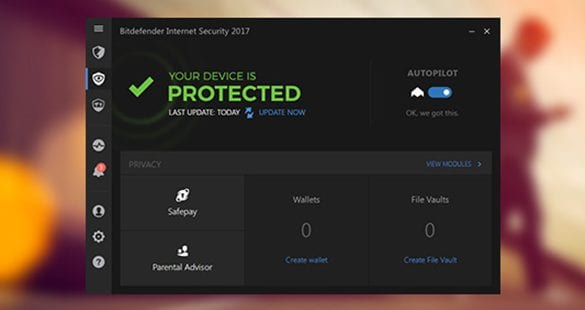
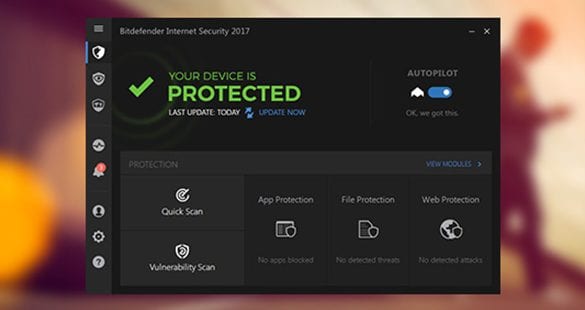
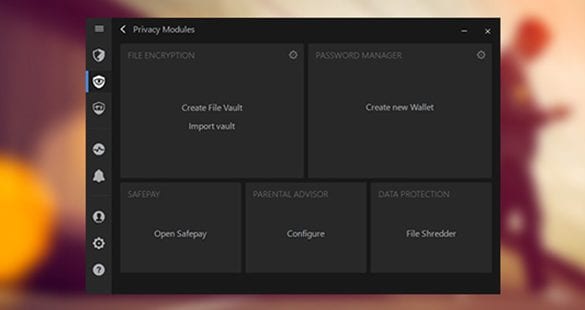
Even a quick glance at the interface suffices to realize that it’s streamlined and easy to understand. The large buttons linking to the primary features are convenient and perfectly accord with Windows 10 style, being particularly good for touch screens, too. Appropriate user awareness is contributed by the prominent security status area at the top, with colors varying for different levels of current safety. The main screen’s top section is also occupied by the Autopilot component. The left-hand sidebar includes vertically lined-up icons for the following modules: Protection, Privacy, Activity, Account Info, Notifications, Settings, and Support. Depending on the section selected in the sidebar (Protection or Privacy), the action buttons in the central part of the GUI will include Quick Scan, Vulnerability Scan, Safepay, and Parental Advisor. Each one opens up into a more detailed page for customization and task assigning.
With the default settings unaltered, Bitdefender’s impact on system productivity turned out somewhat tangible – not that the PC was freezing or performing generally slow, but CPU consumption would hump over 90% once in a while during the scan or update tasks, and Windows boot times increased conspicuously. This issue is bypassable when the Bitdefender Photon feature comes into play. We found scanning with Bitdefender not to be lengthy for an application as powerful as that. On the other hand, though, cleanup of an infected computer is typically a time-consuming process. This nuance set aside, the usability benchmark is fairly good: the setup causes no trouble, the interface is wonderfully balanced and comprehensive, and system performance is only affected within reasonable bounds.
Features
The toolkit hard-coded into Bitdefender Internet Security 2017 covers all facets you might possibly need protected when performing routine activities, and actually provides even more than that. You additionally get the all-new ransomware protection, far-reaching privacy and social networking protection, reliable defense when visiting e-commerce websites, and the Wi-Fi security feature. Plus, the suite offers some options for improving the way your computer operates by delivering a number of performance enhancement opportunities.
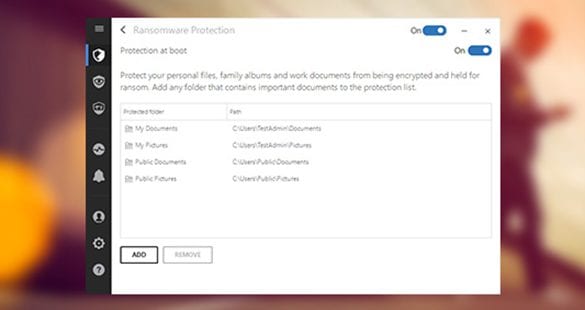
- Advanced Ransomware Protection is a brand-new feature in Bitdefender’s arsenal. Along with going tough on unverified code that exhibits suspicious behavior, the product also prevents unauthorized access to hard drive directories with the user’s sensitive data stored in them. Owing to these measures, ransom Trojans won’t be able to scan and encrypt personal information inside the protected folders.
- Active Threat Control basically translates to Bitdefender’s award-winning antivirus technology which is a combination of intelligent heuristics, dynamic detection and signature-based instruments for accurate and efficient real-time defense.
- We already mentioned Security Widget in the above section – it is a feature that continuously keeps you informed and allows quick access to security-related tasks without actually having you open up the main interface. Another great thing about this desktop element is the option to drag-and-drop the items you would like to get checked for infections. Should there be any important notifications for you to review – the widget will display them as pending, and you’ll just need to click the corresponding button to learn more.
- Bitdefender Autopilot reflects the vendor’s pursuit of silent security. It minimizes user interaction in making security decisions so that you won’t be disturbed in situations where the program can find an optimal path on its own. Therefore you can relax and basically leave it all to Bitdefender – it knows how to manage your security.
- Bitdefender Safepay is invaluable when you are banking or shopping online. This feature automatically opens such web pages in a secure browser to prevent man-in-the-middle attacks as well as any other attempts of unauthorized access or identity theft. In the 2017 version, Safepay can also automatically fill out the billing fields for you.
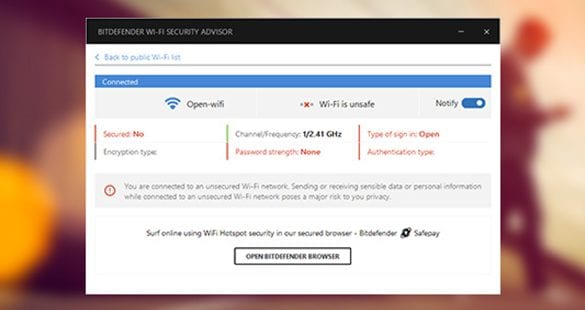
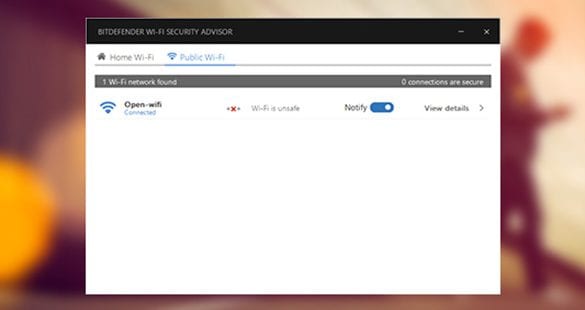
- Wi-Fi Security Advisor protects you against privacy risks when you use unsecured public wireless hotspots. It checks Wi-Fi networks for security weaknesses and provides recommendations to avoid sensitive data theft. For instance, it may prompt you to leverage the Bitdefender Safepay feature.
- The enhanced Privacy Firewall won’t let intrusion from the outside get through. The peculiarity of this defensive component is the fact it monitors both in- and outbound traffic, including cases when you are online via Wi-Fi connection.
- Quick Risk Checker identifies vulnerabilities in unpatched software, as well as insecure system settings that might be potentially exploited by cyber criminals to gain unauthorized access to the PC, steal private data, add your machine to a botnet, etc.
- Bitdefender Internet Security 2017 proved to do a great job filtering out unwanted emails with the Anti-fraud feature. It’s common knowledge that spam is not only annoying but might as well be bundled with drive-by downloads or a variety of other threats.
- Anti-phishing is there to make sure you do not disclose your credentials, such as usernames, passwords, etc., on websites designed to resemble genuine online services, in fact being phony. This feature prevents you from accessing such web pages.
- Bitdefender Central provides access to your Bitdefender account, including the information on licensing and statuses of your services. It also gives you the controls and monitoring ability with regard to your Bitdefender installations on other PCs and mobile devices.
- Parental Advisor, now enhanced in Bitdefender Internet Security 2017, allows setting different profiles for each of your kids, blocking inappropriate content, and even monitoring their activity on Facebook regardless of the type of device they are using for social networking.
- Removable Media Scanner keeps contagious flash drives from contaminating your machine and passing the infection over to other computers.
- Search Advisor keeps you from being infected when on search engines as well as social networks, including Facebook and Twitter. It can identify malicious links in search results or ones that someone might have posted on your wall, and advises you on maintaining security of your social networking accounts.
- Should you need to get some sensitive items irreversibly deleted from your computer, File Shredder will help you out. It utilizes an advanced data wiping algorithm to make sure no file traces are left after such erasure.
- With Bitdefender Photon, you get a highly intelligent tool that adapts to the specificities of your system within a short time so that overall performance and the program’s operating speed are tangibly improved.
- The enhanced Battery Mode prolongs battery life on laptops and tablets by means of automatically toggling the respective system settings when the power cord is unplugged.
- Rescue Mode is to be used in emergencies, where overly persistent threats do not yield to regular cleaning. When in this mode, such critical infections can be taken care of without complications.
- Password Manager has been enhanced in the 2017 version. It securely stores your sensitive details, spots weak account passwords and recommends strong ones instead, and autofills them during web surfing.
- With the Weekly Security Report feature active, Bitdefender Internet Security 2017 will be automatically generating the list of security-related events and recommendations on a weekly basis. In the report, it provides all malware detections made, the action that was taken to neutralize the threats, and tips to stay on the safe side.
Efficiency
In terms of protection, Bitdefender is in close competition with the industry’s flagship suites, which is certainly not by chance. Not only is it equipped with one of the most complete feature sets across the board, but the software is also extremely reliable when it comes to actually detecting and eliminating the bad stuff. This has been verified by multiple labs whose reputation is indisputable.
An extremely helpful feature of Bitdefender Internet Security 2017 is ransomware protection. Ransom Trojans are highly dangerous because they encrypt one’s personal files and extort a payment for decryption. The risk of data loss is aggravated by the fact that InfoSec masterminds haven’t yet come up with an efficient method to get the data back after such an assault. The new Bitdefender defaults to protecting such folders as Documents, Pictures, as well as sync directories like Google Drive. The user can add more data repositories manually.
In AV-Comparatives’ Real-World Protection Test as of December 2016, the software showed 99.9% protection rate, gaining the ‘Advanced+’ rating, which we already mentioned in this review. Furthermore, Bitdefender didn’t fail to pass a single VB100 certification since 2010. According to the latest evaluation by AV-TEST, the product scored 6.0 out of 6.0 by the protection benchmark. Therefore, no doubt this suite will match and probably exceed your expectations while guarding you from viruses, spyware, spam, and identity theft attempts.
Help & Support
Bitdefender help is wonderfully structured and organized. It has it all: the FAQs, online knowledgebase, comprehensive User’s Guide, the Forum, online chat, and worldwide telephone support. Frankly, with the abundance of self-help options and their immaculate informative value, the need to reach customer service agents directly is not a likely probability here. And yet, live support is responsive and professional. All in all, we really admire the help emphasis and effort Bitdefender takes.
+/- (Pros/Cons)
- Ransomware protection
- Wi-Fi Security Advisor
- Effective firewall
- Easy-to-use interface
- Outstanding customer support
- Excellent lab scores
- Lengthy scanning and malware removal
Bottom line
Consistently high lab results by all determinative criteria, overarching feature set, and unfailing dedication to the customer – these are the prominent facts that make Bitdefender Internet Security one of the flagship applications in its niche. Remarkably enough, all controls are made amazingly simple despite the inner sophistication this utility bears. As a wrap up, Bitdefender Internet Security 2017 provides hassle-free silent protection of premium quality, now covering ransomware assaults.











I’ve been a user of Bitdefender IS for several years now, and my experience has been generally positive, and similar to your scores. But problems do arise, and that’s when the weak link shows.
Sadly, the company’s tech support almost always lets it down. It’s an enormously frustrating experience, one that I’ve found very hard indeed to get a straight, consistent or prompt answer from. I’d put the “Support” score at three and a half stars, at best.
thanks for your honest evaluation