The average Internet surfer tends to encounter issues with passwords once in a while as most people typically have lots of personal online accounts and it may therefore ‘take a scientist’ to keep this whole bulk of authentication data in mind. Writing login credentials down is not a very good idea either because then you can’t be sure they are ultimately safe and don’t get retrieved by someone having wicked intensions. Also, the issue of having strong passwords is now as relevant as probably never before. So how do you make sure your accounts and your online identity don’t get compromised this way?
There is a utility that does the trick. It’s called Kaspersky Password Manager. This is a computer program that helps users generate secure passwords and makes the process of entering them into web pages completely automated.
The exceptional convenience combined with unbeatable reliability and ultimately secure digital environment created – make Kaspersky Password Manager an irreplaceable assistant for both home and business users. At least, those who tried using this tool can now hardly imagine their cyber routine without it and basically never switch to other similar products or discontinue the use of this one. This review will give you a complete idea why this software is so much favored by users worldwide.
System Requirements
Operating System:
- Windows XP / Windows Vista (32/64 Bit) / Windows 7 (32/64 Bit) / Windows 8 (32/64 Bit)
Hardware:
- At least 512 MB available RAM
- 10 MB free HDD space
Supported Browsers:
- Microsoft Internet Explorer 6.0-10.0
- Mozilla Firefox 2.x-25.x
- Google Chrome 6.0-30.0
- Maxthon 2.5.x
- Flock 2.xx
- Seamonkey 2.0.8-2.22
- Yandex 1.5
Usability
We’ve already kind of got used to the choice between licensed copy and a 30-day free trial with Kaspersky products, their Password Manager being no exception to this pretty pleasurable pattern. If it’s the commercial version that you choose, you’ll be flattered by the little asterisk note on the registration screen, saying ‘license does not expire’. That means you just select the number of PCs to protect, purchase the tool and use it for as long as you like – at least, that’s what it sounds like.
Installing this password manager is a piece of cake, really. It’s small in size, so the only thing the download speed depends on is your Internet connection quality. When going through the setup, note that the tool does not work in Safe Run mode of Kaspersky Internet Security 2010 and 2011.
The first thing to do after installation is to define a strong master password which is to become the key to the rest of sensitive information you are about to store with the aid of the software. Without the master password, no one can possibly access the personal data protected by this product, though there is one little aspect here. Alternatively, the password database can be unlocked using a pre-specified USB or Bluetooth device connected to the machine. The default software configuration is set to lock the database after 10 minutes of idleness; by the way, you can define your own time-out using the program’s settings. One great thing to outline right away is the virtual keyboard which you can use for entering your confidential details, thus eliminating the risk of getting your keystrokes recorded by spyware or keyloggers.
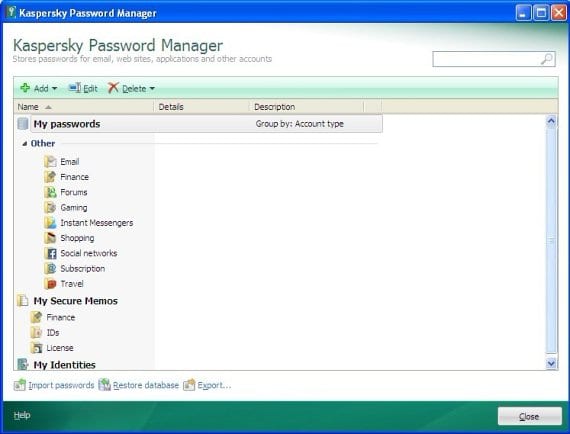
The user interface might at first sight appear too plain to be true, yet the product’s functionality is entirely integrated into these looks, so you get both simplicity and full usability blended. Also, there’s no need to worry about any kind of overly system resources consumption – this won’t happen. Kaspersky Password Manager is tuned to accommodate a perfect balance of performance and efficiency.
Features
Kaspersky Password Manager’s motto is ‘Protect Your Digital Identity’, and that is the phrase that precisely outlines its basic objectives. This leitmotif is the key to defining this application’s functionalities and features which we are going to dwell on in this section:
- Kaspersky Password Manager can automatically create strong passwords for you upon your request. It’s no secret that there are fraudsters out there doing their ‘best’ to figure out what one’s passwords are and thereafter use this illicitly obtained information for stealing your identity. Moreover, the weaker your password is, the more likely these culprits can succeed in their bad endeavours. So with this app at your disposal, you don’t have to worry about someone guessing or otherwise getting hold of your passwords.
- Kaspersky Password Manager greatly facilitates inputting passwords during logon. To be more specific – it does the job for you, concurrently ensuring the safety of your data. The software encrypts this information and keeps it in a well protected location on your computer. This is obviously a convenience combined with cyber security, which is not to be underestimated in the present-day Internet.
- To secure your identity when you’re accessing sites on a different machine, Kaspersky Password Manager provides the so-called ‘mobile’ feature that enables launching the program from an external device such as a memory stick, a mobile phone connected to your PC via Bluetooth etc. All you need to do in that case is enter your ‘master password’ and work like you usually do. Once the mobile device is removed, the program immediately locks the password database and completely clears all traces of your activity on that computer.
- Filling out online forms for the user automatically is another unique virtue of this utility. All you have to do is provide your name, your birth date, Email addresses, location, phone numbers, sex etc. on Kaspersky Password Manager’s special interface once, and further on it will enter those personal details of yours each time you want to apply for a new online service.
- Kaspersky Password Manager does a great job protecting you from keyloggers which are pieces of malware meant to record a user’s keystrokes. How does this defence get implemented? It’s simple – the app doesn’t actually involve the keyboard while entering your personal credentials. So the vicious keyloggers are definitely not an issue of concern if you are using this tool.
- Protection against phishing is something that Kaspersky Password Manager combats efficiently. FYI, phishing is malign activity which consists in enticing you to follow a link to a legitimately-looking, yet a fake website where you are asked to provide your login and password information to a certain service. As long as Kaspersky Password Manager is running on your workstation, it checks whether the URLs you go to are safe and genuine, and the bad ones get blocked.
- Kaspersky Password Manager creates scheduled backup copies of your password database. This feature allows you to be confident that none of your data gets lost in case some damage occurs along the way.
Efficiency
The product being tested has shown itself to advantage in the context of reliability in performing the tasks it’s intended to cover. To start with, the virtual keyboard allows avoiding any unwanted consequences of getting your keystrokes logged by ‘third parties’. The master password principle largely contributes to safety of your private data and sensitive credentials. All of the personal information is stored in a secure encrypted database on your PC, so its intactness is out of the question. Along with actually managing your passwords, Kaspersky Password Manager helps you create new ones complying with the targeted meter to make sure those are strong and nearly impossible to guess, even if there’s a so-called dictionary attack on you which is a pretty sophisticated technique employed by criminals to defeat the cipher or authentication mechanism. So, as far as effectiveness is concerned, this software won’t let you down.
Help & Support
The exceptional and clearly discernible focus on customer service has been like a business card of Kaspersky Lab for years. As long as you are using one of their products, this spectrum of client support services is entirely at your disposal, so you become a part of sort of a privileged community. Not only does the vendor declare to offer its users a diversified approach to help and support (telephone, email, chat) – it actually provides it all with commitment and quality. Kaspersky Lab’s official pages can as well be found on social networks and YouTube, so you can easily stay on top of the security news. Regarding the self-help stuff, the FAQs and extensive knowledgebase are available directly from the user interface. One last thing to point out is the company features global support, so no matter if you are from America, Europe, Asia, Africa or other part of the world – you’ll get assistance in your language within a short time frame.
+/- (Pros/Cons)
- Reliable encryption of sensitive data
- Automatically fill out online forms
- Generates strong passwords
- Virtual keyboard
- Portable (‘mobile’) version
- Authentication via USB or Bluetooth available
- Ease of use
- Safari web browser not supported
Bottom line
The benefits of using Kaspersky Password Manager software are obvious. You get a tool that intelligently fulfils some of the cumbersome routine tasks for you, hence facilitates everyday authentication and makes your life a little easier overall. It’s reliable, simple and convenient. So if you want to create hard-to-guess strong passwords and manage them efficiently, then this application is certainly the right pick.